Now you can install SMPlayer on Windows 10 from the Microsoft Store:
https://www.microsoft.com/store/apps/9N80Q5M0QXW6
How to fix the video problem on Wayland
Some people reported problems when using SMPlayer on a Linux desktop with Wayland. The main problem usually is the video being on a separate window, but it can also be a black window or a crash when trying to play a video.
Here is how to fix it. There are two possible ways:
- Select a different video output in Preferences -> General -> Video. Usually at least x11 should work.
- Install SMPlayer using a flatpak or snap package. These packages provide patched versions of mpv and mplayer which should fix the problem. More info here: https://www.smplayer.info/install-snap-flatpak-appimage.php
SMPlayer 21.8 has been released
Main changes:
- A version for Mac OS is now available.
- Better automatic resizing of the main window, trying to prevent black borders.
- Fix loading YouTube playlists.
- Add an option to rotate the video by 180 degrees.
- Playlist: try to prevent a one second delay when using play prev/next.
- Add some predefined speeds (0.25x, 0.5x, 1.25x, 1.5x, 1.75x).
- Fix audio CD playback with mpv.
- Fix audio channels.
Windows:
- The installation of YouTube support is now optional.
- Using Qt 5.15.2.
Linux:
- Disable power saving on Wayland during playback.
- Remove KDE from the categories in the *.desktop files.
- SMPlayer is now also available as appimage, flatpak and snap.
SMPlayer available for Mac OS
Finally there’s a version of SMPlayer for Mac OS!
You can get a prerelease here:
https://github.com/smplayer-dev/smplayer/releases
Sources moved to github.com
The sources have been moved. You can find them here:
- smplayer: https://github.com/smplayer-dev/smplayer
- smplayer-themes: https://github.com/smplayer-dev/smplayer-themes
- smplayer-skins: https://github.com/smplayer-dev/smplayer-skins
- smtube: https://github.com/smplayer-dev/smtube
SMPlayer 18.9 features the possibility to cast videos to mobile devices
SMPlayer 18.9 provides an experimental feature to send videos from your computer to mobiles devices, like smartphones and tablets, in a very simple way.
All you have to do is open a video in SMPlayer and then select the option Cast to -> Smartphone/tablet within the Play menu.
SMPlayer will display a QR code which you can scan with your device. It provides the URL of the video which you can open with any media player in your device.
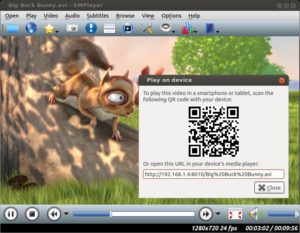
If you open the URL with an application such BubbleUPnP, LocalCast or similar, then you can cast the video to any device supported by that application, like Chromecast, TVs with DLNA support, Fire TV and so on.
What do you think about this feature? Do you think it’s useful?
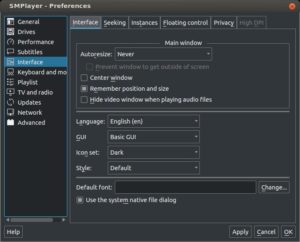
New dark theme
SMPlayer 18.2.2 brings the possibility of subtitles with semi-transparent background
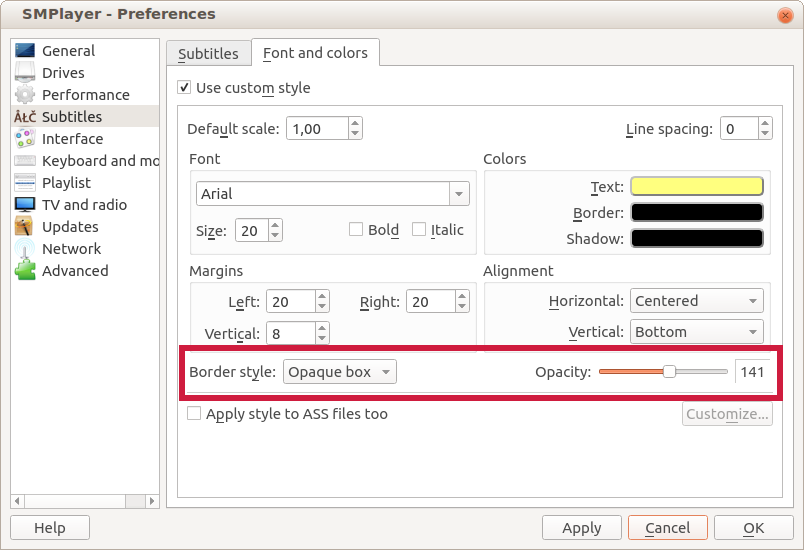
Now in SMPlayer 18.2.2 is possible to display subtitles with a semi-transparent background.

Go to Preferences -> Subtitles -> Font and colors, select Opaque box as border style, now you can adjust the level of opacity of the background.
Other changes in this version:
- The option Open -> URL can now also load YouTube playlists.
- The options for the preferred number of track for audio and subtitles are back.
- (mpv) Now the direct3d is the default video output for Windows, since some users reported problems with the gpu output.
SMPlayer 17.11 has been released
Main changes:
- The video equalizer by software has been fixed.
- The thumbnail generator is now more precise with short videos.
- The audio quality of the audio equalizer has been improved.
- The option “add black borders on fullscreen” has been fixed.
- The option “AC3/DTS passthrough over S/PDIF” has been fixed.
SMPlayer 17.10.2 has been released
These are the changes:
- New option in Preferences -> Network to select the preferred quality for streaming sites such as DailyMotion, Vimeo and so on (all those which are handled by youtube-dl).
- The audio equalizer is now disabled by default on Linux to prevent a no sound problem for users with old versions of mpv.
- Fix some problems with the letterbox filter (the ‘add black borders’ option).
- The HDPI support is now also enabled on the portable package for Windows.
- Fix subtitles not disappearing when using the letterbox filter with mplayer.
- Fix: now the time is correctly displayed in the thumbnail generator pictures when SMPlayer is built with Qt 5.