SMPlayer 18.9 provides an experimental feature to send videos from your computer to mobiles devices, like smartphones and tablets, in a very simple way.
All you have to do is open a video in SMPlayer and then select the option Cast to -> Smartphone/tablet within the Play menu.
SMPlayer will display a QR code which you can scan with your device. It provides the URL of the video which you can open with any media player in your device.
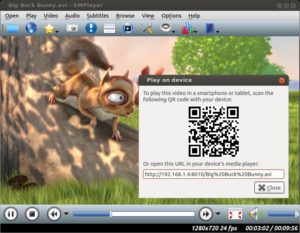
If you open the URL with an application such BubbleUPnP, LocalCast or similar, then you can cast the video to any device supported by that application, like Chromecast, TVs with DLNA support, Fire TV and so on.
What do you think about this feature? Do you think it’s useful?
Hi, this chromecast to Android it’s a great feature but I can’t open link by scanning qr code. I try many apps but with no luck. By means, the code it’s recognized but it’s not recorded. I use an clipoboard app and indeed after scenning there’s no link recorded.
Any suggestion for an app that works with SMP by processing “scan-and-open (browser/player)” on the go?
I’m on a rooted HTC One M9 – ViperOneM9 – Android 7.0
Regards
I’m using this application:
https://play.google.com/store/apps/details?id=me.scan.android.client&hl=en_US
After scanning the code it allows me to open it in a media player.
I think its an awesome idea, but in practice, I would only pretend to transmit the video from my laptop to the smart tv, but accordingly to the steps, it’s necessary scan the QR Code, and with a smart TV is not possible. This woould replace the use of wire to connect both devices to play videos stored in the laptop.
I consider it a fantastic feature, highly useful
Hello,
SMPlayer has become by GoTo for the past few years. Thank you folks for all your great work. Not sure if this is the right place, but thought I’d leave a list of wishlist items for the future:
1) The ability to hold the mouse over the slider bar and see the frame corresponding to that position. I know this is possible because ExMplayer has had that feature for multiple years.
2) No need to compete with Kodi or anything, but I would like support some basic `media manager’ features. Tagging, integrated searching, thumbnail management, ability to hover over a thumbnail and see video summaries etc are critically important when you are dealing with hundreds of videos. Ideally an interface that resembles modern video websites.
3) Support for some basic video editing. It does not have to compete with full-fledged non-linear video editors like Kdenlive or Openshot, but I should be able to (say) increase the brightness of a video, perform basic cropping etc and save the output to disk with reasonable quality with an intuitive, mouse-driven interface.
Are any of these items being considered at all? Once again, thanks for your work to date.
Just tried out this new feature, casting to my Android phone and it worked perfectly.
Does smplayer do upnp dlna client ?
Can it function as a client
Hole.
Qtwebkit lleva más de un año “despreciada” y ya no la usa ningún programa modeno. Podrían modernizar Smtube para que use QtWebEngine?
Un saludo.
PD: Sería buena idea añadir compatibilidad con KDE Connect para poder enviar vídeos directamente a otros dispositivos. Sí, se puede hacer copiando y compartiendo el portapapeles, pero compartir todo el portapapeles es un ataque a la privacidad. Mejor que se pueda enviar sólo el enlace del vídeo.
Sí, pero cambiar a otra cosa lleva tiempo.
Can I submit suggestions and bugs for SMPlayer here?
I have 3 suggestions.
1. Could you put the video speed always visible in the lower left corner of the status bar? Or even in another point. Maybe on the same speed control button?
2. Could you set the volume of the player fixed to 100? And make it independent and not “connected” to the system volume when increasing or decreasing?
3. Could you change some customizable “buttons” too big and long in the toolbars, for example “forward for frame” or “speed + 10%” and other buttons with too long text? And make them real little buttons that take up less space?
Thanks for your job! SMPlayer is the best …
Hi,
I put in a request for the smplayer. My request is: I had this player for a while until I needed a dvd ripper. I then switched to VLC Media Player. SMplayer has a lot more to offer than VLC except, it is unable to rip dvds. If SMPlayer could do that, I might switch back over to SMPlayer.
Is it possible for this request to become a feature request for this player? If this player ripped dvds on top of what it already does, then I would switch back to smplayer.
I want to cast from windows 10 to TV, how to do it?
I have long tried the best free video players. Without a doubt smplayer is the fastest, lightest, most efficient and reliable. Excellent work!!!
Can you tell us more about this? I’d care to find out
more details.
Its very good but I cant have sound on tv with casting :((( somebody can help me?